Skip to content
Digital Signatures

Visible Digital Seal (VDS)

Documents that prove themselves, on paper or on screen. T4 VDS signs a document’s key data into a QR code or Data Matrix that anyone can verify offline.
Formats
QR code · Data Matrix
Verification
Offline, on the device
Apps
Seal Studio · Android
  • ICAO 9303-13Visible Digital Seals
  • BSI TR-03137Seal profile
  • ICAO VDS-NCNon-constrained
  • ICAO IDBBarcode datastructure
  • ISO 22376VDS data
  • ECDSA P-256Signature
T4 VDS

Documents that prove themselves, on paper or on screen.

T4 VDS signs a document’s key data into a QR code or Data Matrix. Anyone can scan it and confirm the document is genuine and unchanged, with no database lookup and no internet connection.
  • Works offlineOnly the seal and the issuer’s public certificate are needed.
  • Tamper-evidentChange one character and the signature no longer matches.
  • Paper or screenPrinted certificates, visa stickers, PDFs and wallet cards.
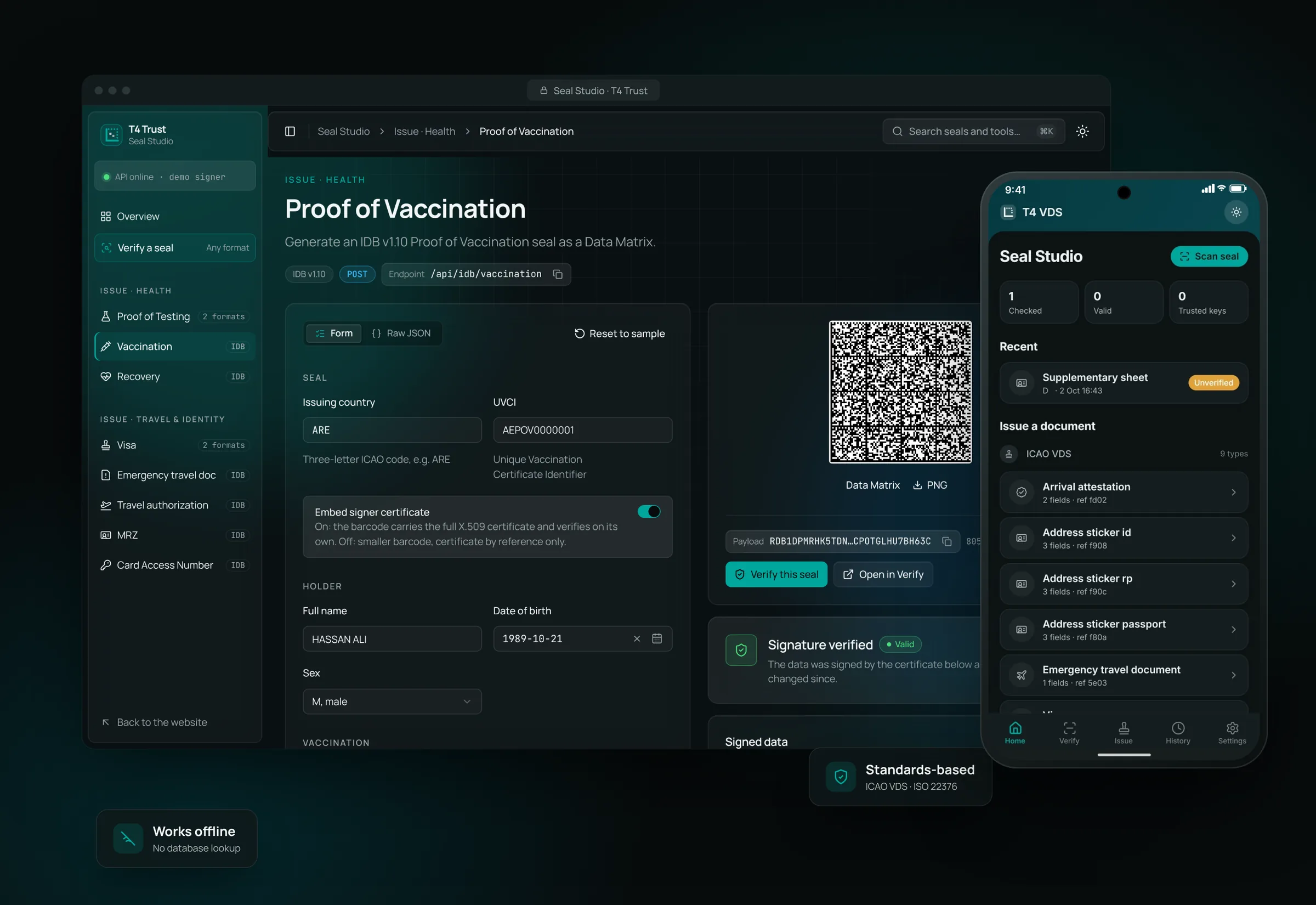
T4 Seal Studio issuing a Proof of Vaccination seal on a laptop, next to the T4 VDS mobile app
What's inside a seal

The document’s data, signed and printed as a barcode.

A Visible Digital Seal carries the information that matters on the document, plus a digital signature from the issuer. If anyone changes a name, a date or a result, the signature no longer matches and the verifier says so.
  • Header: who issued it, and whenIssuing country, document type, signer certificate reference, signature date.
  • Message: the data you protectHolder name and date of birth, document or passport number, dates, results, entitlements, and any field the use case defines.
  • Signature: proof it hasn’t changedECDSA P-256 over header and message, with the signer certificate embedded or referenced, trusted through the issuer’s certificate chain.
How it works

Issue once. Verify anywhere.

  1. 01

    Issue

    Your system sends the document data to T4 VDS. It signs the data with your issuing certificate and returns a QR code or Data Matrix.

  2. 02

    Print or send

    Add the seal to the document: a printed certificate, a visa sticker, a PDF or a mobile wallet card. Standard printers are enough.

  3. 03

    Scan and verify

    A border officer, employer or customer scans the seal. The verifier checks the signature offline and shows the signed data next to a clear valid or invalid result.
Live demo · Seal Studio

See it work in two minutes.

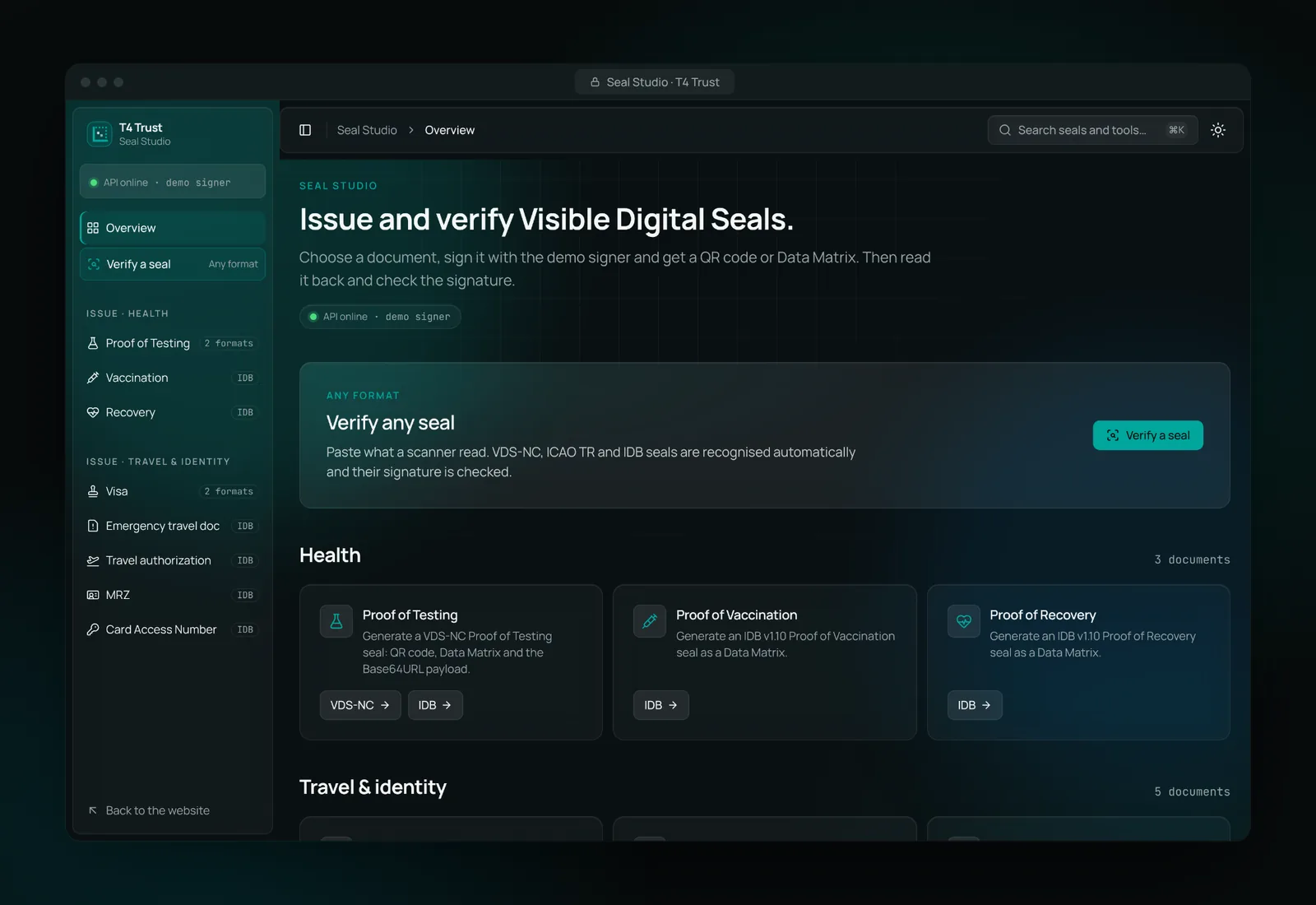
Seal Studio is our hands-on demo. Pick a document, generate a signed seal, then verify it. The forms come pre-filled with sample data, so you can try it without preparing anything.
Seal Studio overview: issue and verify Visible Digital Seals

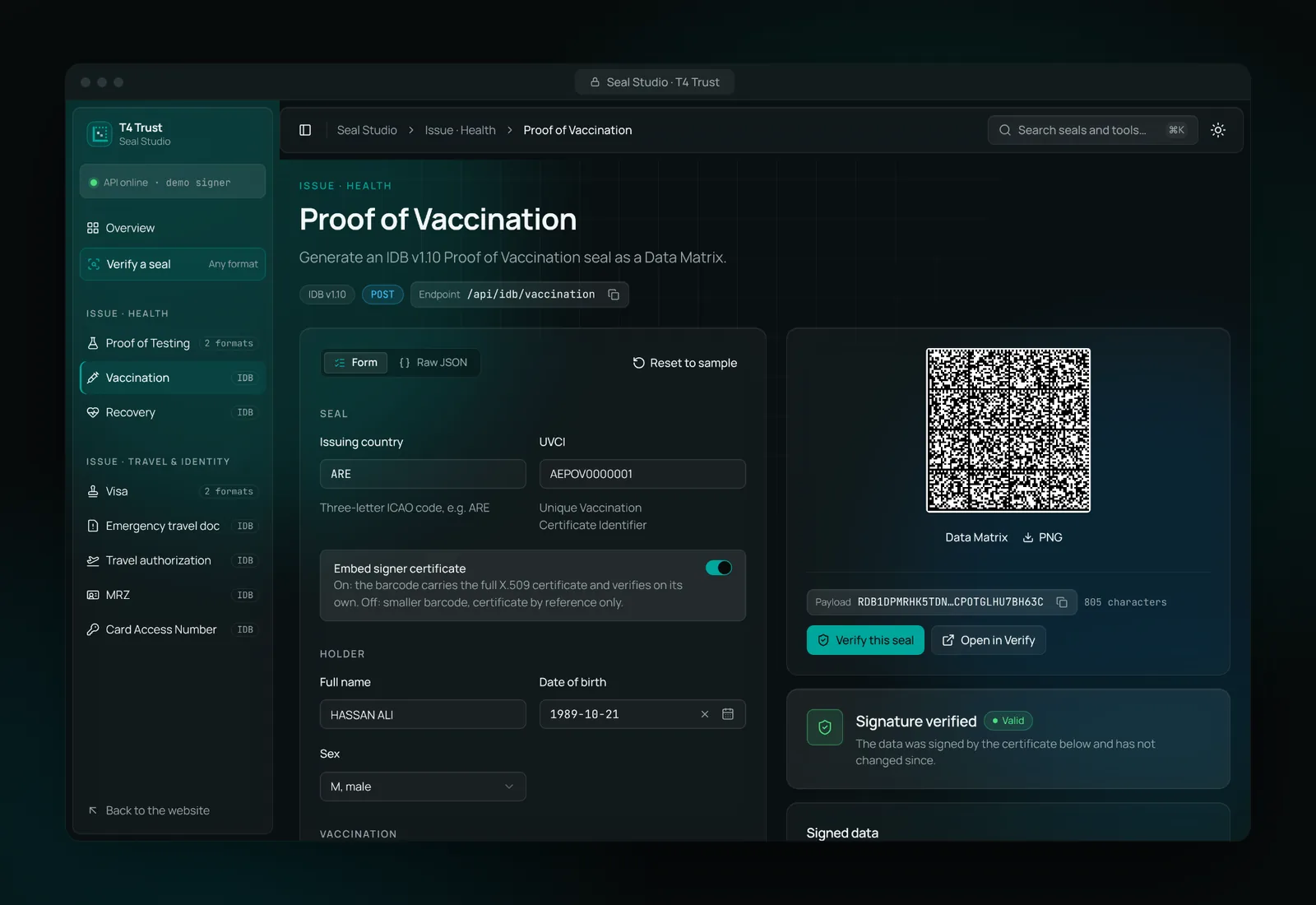
Generate a signed seal in seconds

Fill in the document data, or keep the sample values, and press Generate. Seal Studio signs the data and draws the barcode, ready to download as a PNG.
  • Form view for people, raw JSON for developers
  • Embed the signer certificate, or reference it for a smaller code
  • The same API your systems call in production
Seal Studio form for a Proof of Vaccination with the generated Data Matrix seal

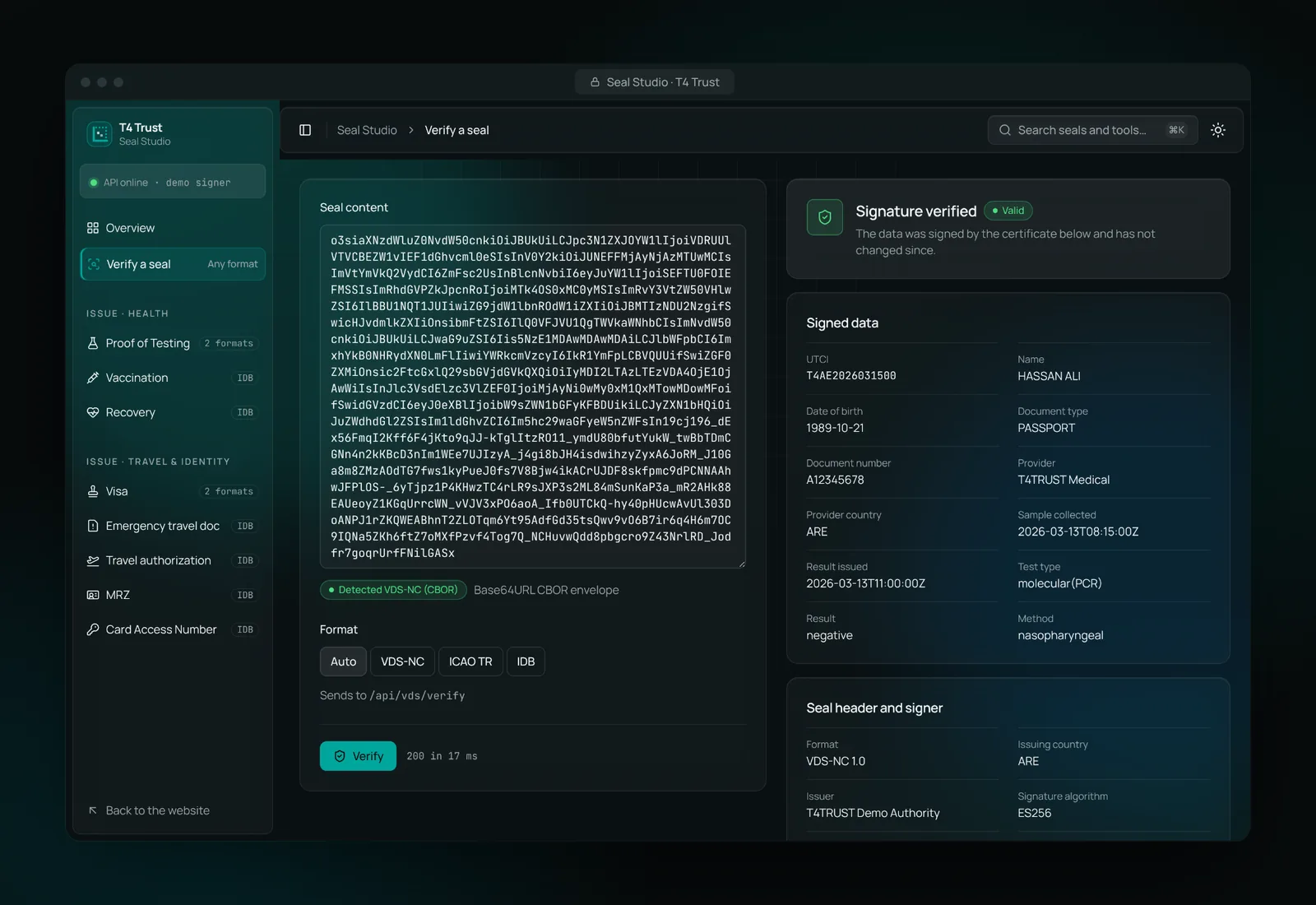
Verify any seal, whatever the format

Paste what a scanner read. Seal Studio recognises VDS-NC, ICAO and IDB seals on its own, checks the signature and lists every signed field.
  • Clear result: verified, not verifiable, or invalid
  • Shows the issuer, signature algorithm and certificate dates
  • A changed character anywhere breaks the signature
Seal Studio verify page showing Signature verified, the signed data and the signer certificate

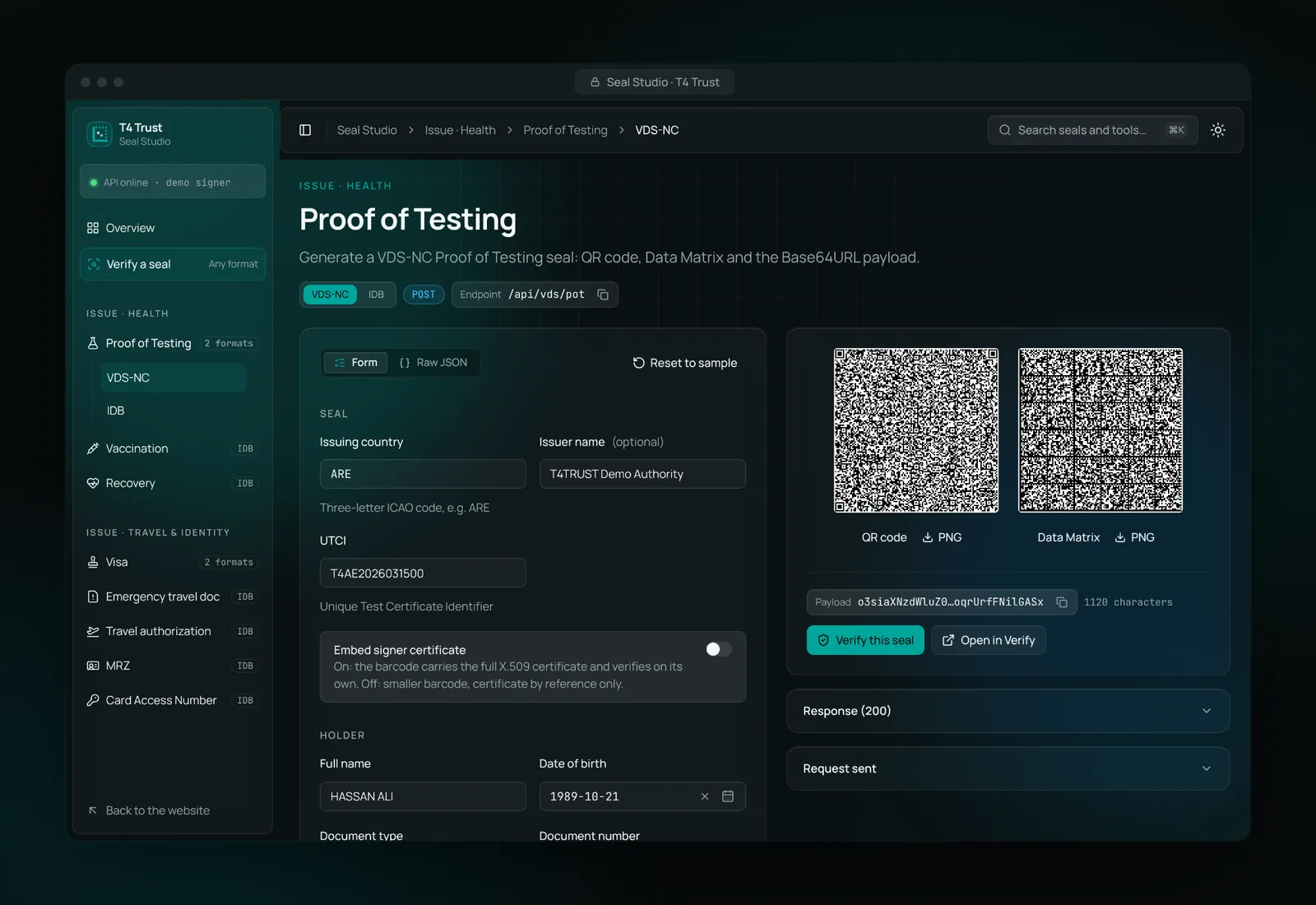
QR code or Data Matrix, your choice

Use a QR code for phones and a Data Matrix where space is tight, such as visa stickers and small labels. Both carry the same signed data.
  • VDS-NC (CBOR) for health and travel proofs
  • ICAO binary seals for visas
  • ICAO IDB for compact identity and travel documents
A Proof of Testing seal generated as both a QR code and a Data Matrix

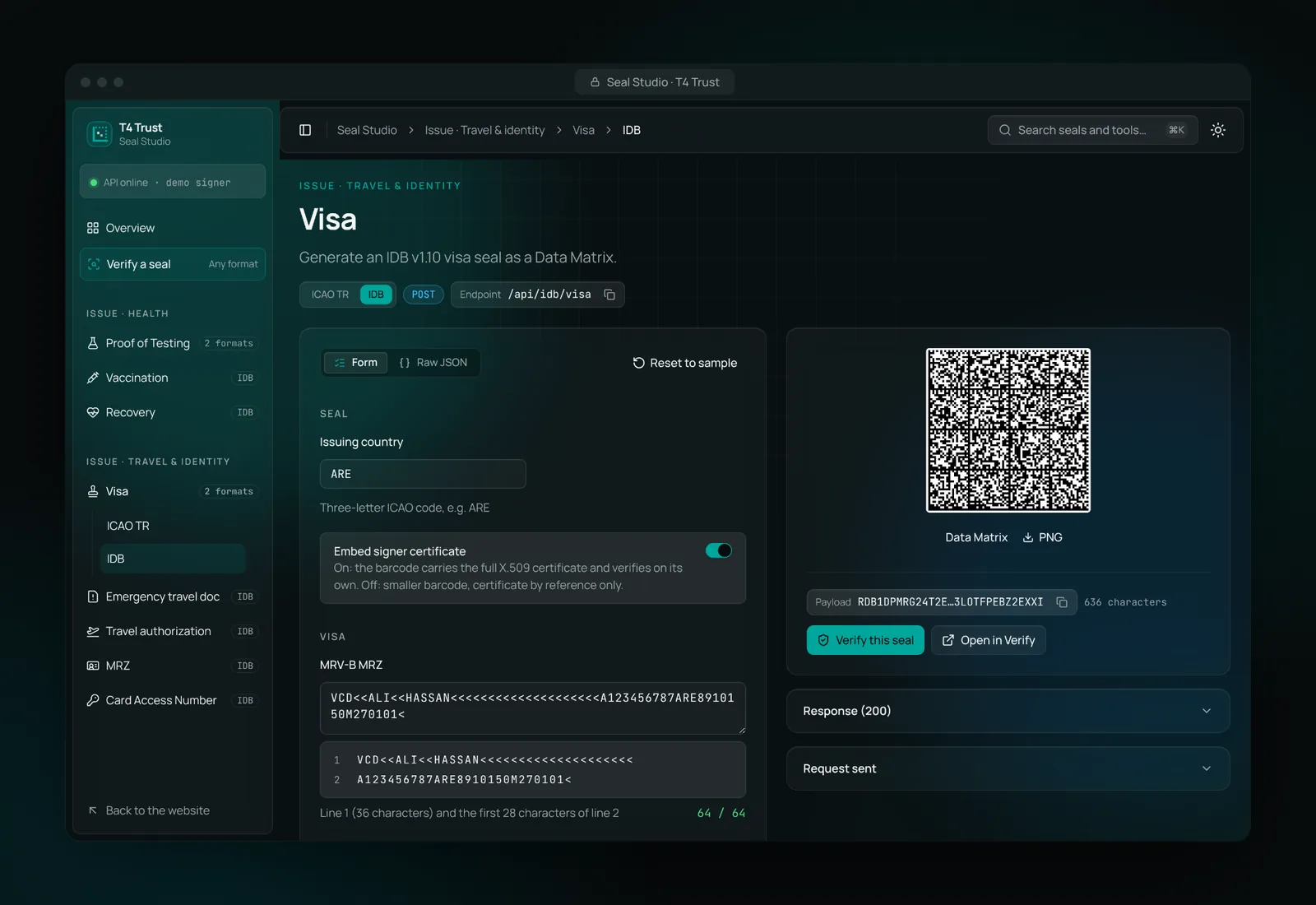
Ready for visas and travel documents

Seal the MRZ, passport number, number of entries and length of stay. Border staff can check a visa against its seal at the counter, even with no connection.
  • Visa, emergency travel document and travel authorisation
  • MRZ seals for TD1 cards and TD3 passports
  • Card Access Number seals for eID cards
Seal Studio generating a visa seal as a Data Matrix
T4 VDS mobile app

Scan, check and issue seals from a phone.

The T4 VDS app for Android reads a seal with the camera and checks it on the phone itself. No server is involved, so it works at a border post, a front desk or anywhere without signal.

Specifications: BSI TR-03137 · ICAO Doc 9303-13 · ICAO VDS · ICAO IDB
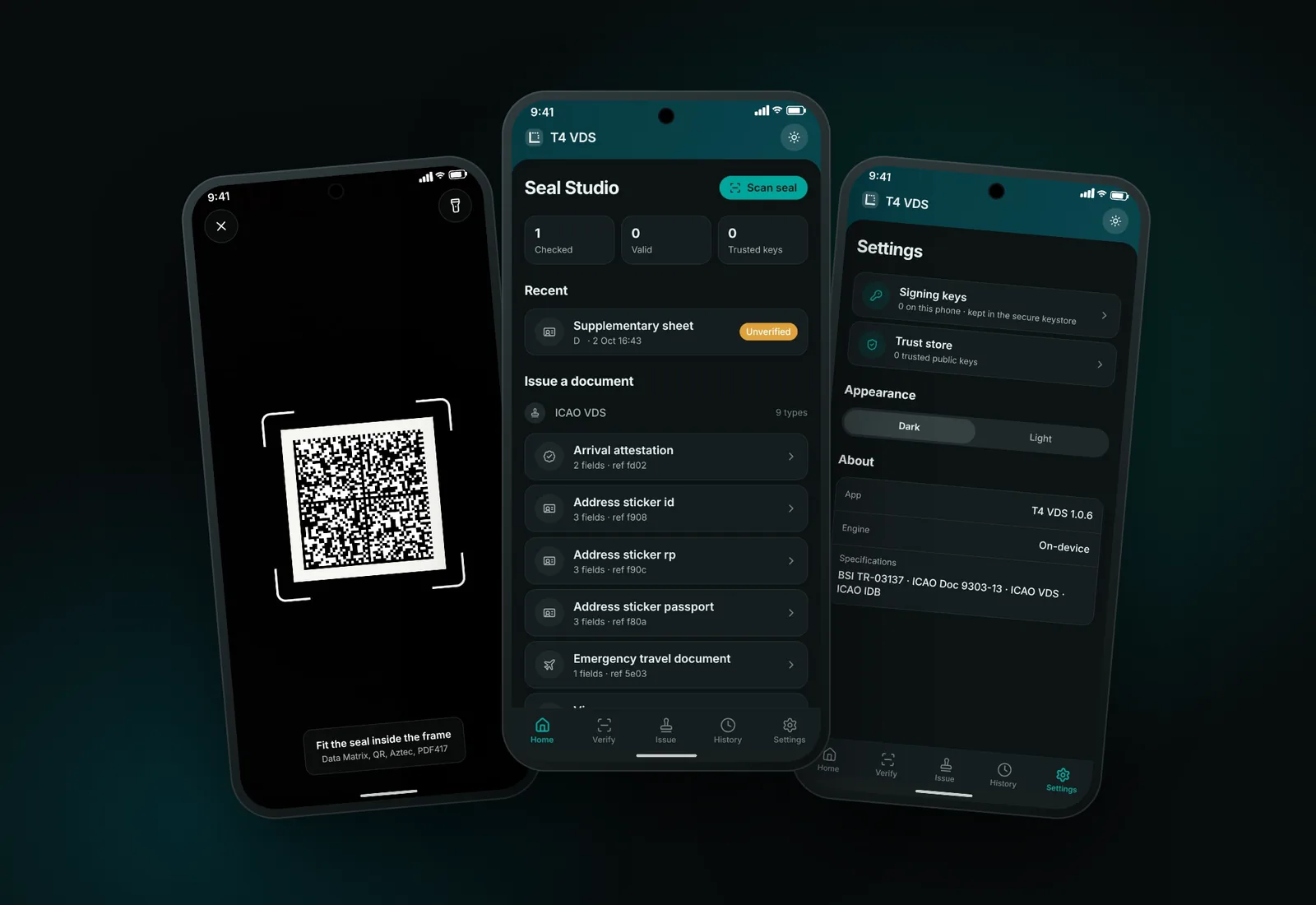
  • Scan any sealData Matrix, QR, Aztec or PDF417, read with the camera.
  • Checked on the phoneThe on-device engine verifies the signature against the app’s own trust store.
  • Issue on the goSign ICAO VDS or IDB documents with a key that never leaves the phone.
  • History that re-checksOpening a past seal checks it again against today’s trust store.
  • You decide who to trustManage signing keys in the secure keystore and the public keys you trust.
Three phones running the T4 VDS app: the seal scanner, the home screen and settings
What you can seal

Ten documents in the demo. Any document in production.

The demo ships with health and travel documents. In production, any document whose data matters can carry a seal.

Health

Proof of Testing (VDS-NC, IDB) · Proof of Vaccination (IDB) · Proof of Recovery (IDB)

Travel and identity

Visa (ICAO, IDB) · Emergency travel document · Digital travel authorisation · MRZ TD1 and TD3 · Card Access Number (all IDB)

Built for your use case

Diplomas and transcripts · Professional and employee cards · Certificates and attestations · Product labels and Digital Product Passports · Tax and revenue stamps
Who it's for

For the issuers people need to trust.

  • Governments and public agenciesProtect the documents citizens and visitors carry, and let officers check them anywhere: visas, residence permits and emergency passports; civil status and identity documents; health certificates; licences, permits and official attestations.
  • Enterprises and institutionsStop forged certificates and fake labels without building a verification portal: universities issuing diplomas and transcripts, professional bodies issuing member cards, banks and insurers issuing statements and policies, manufacturers labelling products and supply chains.
Why T4 VDS

Security that travels with the document.

  • Works offlineVerification needs only the seal and the issuer’s public certificate. No database query, no network.
  • Tamper-evidentThe data is signed with ECDSA P-256. Any change to the data breaks the signature.
  • Private by designScans aren’t logged on a central server. The person holding the document controls who sees it.
  • Paper or screenPrint it with the printers you already have, or show it in a PDF or mobile wallet.
  • Standards-basedICAO VDS, VDS-NC and IDB formats, aligned with ISO 22376 and the VDSIC trust framework.
  • Simple to integrateA JSON API issues and verifies seals, so your existing systems keep doing what they do.
Questions

Questions we get asked

What is a Visible Digital Seal?

A Visible Digital Seal (VDS) is a 2D barcode, such as a QR code or Data Matrix, that holds a document’s key data together with the issuer’s digital signature. Scanning it shows the data and confirms that the issuer signed it and that nothing has changed since.

Does verification need an internet connection?

No. The verifier checks the signature using the issuer’s public certificate, which can be embedded in the seal or stored on the device in advance. Updating trust lists from time to time is recommended, but each scan works offline.

Which standards does T4 VDS support?

T4 VDS issues and verifies ICAO Visible Digital Seals (Doc 9303 Part 13), ICAO VDS for non-constrained environments (VDS-NC) and the ICAO Datastructure for Barcode (IDB). It follows ISO 22376 for VDS data and is designed for the VDSIC trust-list model.

Can we use our own certificates?

Yes. In production, seals are signed with your organisation’s own signing certificate, kept in your key store or HSM. The live demo uses a demo signer certificate.

Is there a mobile app?

Yes. T4 VDS for Android scans Data Matrix, QR, Aztec and PDF417 seals and verifies them on the phone, with no connection needed. It can also issue ICAO VDS and IDB seals, signed with a key kept in the phone’s secure keystore.

Is the data in the demo real?

No. Seal Studio comes pre-filled with sample data, and everything is signed with a demo certificate. Don’t enter real personal data in the demo.

How long does integration take?

That depends on your systems and documents. Most teams start by calling the issue API from their existing document workflow. Contact us and we’ll scope it with you.

Generate and verify your first seal.

See the whole flow in Seal Studio, from data to barcode to a verified result, and talk to us about the documents you issue.